Thursday, August 30, 2018

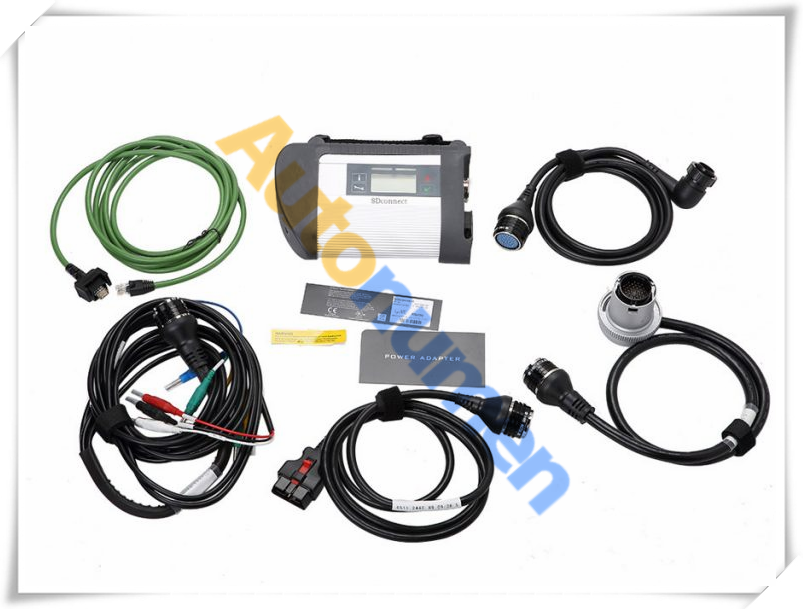
MB SD Connect Compact 4 Star FAQ

Q:Hello,marshall,can you send me some picture about mb sd c4?i need to check,better with some detail,thanks!
A:ok,no problem,
it has user manual in HDD,it need activate,pls check :
This tool you can choose connect with internet by LAN cable or WIFI,when it connect with car,you will see:usually after activate,it will be no problem at all,this item is very stable.
Q:Hello,marshall~I want to have dell 630 format sd c4,does any request on my computer?
A:If you buy the fit all HDD,then you have to use on XP sysytem,if you choose Dell 630,then no request on computer system.
Q:I will be using this to activate cruise control installs on 2012 MB B and C class cars.
This will work?
A:our engineer say it can do .
BUT it depend on car,some car don;t have Cruise control function,then cannot do,and it need you know how to activate it.
Q:  Is SD C4 compatible with window7?
A: It is not stable on WIN7,suggest you not use WIN7, 90% sdc4 software get broken because of the usage of WIN7.
Q: When I click “Diagnostic” to find “Fingerprint ID” of mb sd c4 2013.5 (Item No. SP100-D), I got an error” Internal error (3.17)- 3.89 You must contact the user help Desk “.
A: Check whether your computer is compatible with sd c4 2013.05 software. If you choose d630 hard disk, it needs to work with Dell D630 computer with integrated video card and 1GB memory; if you choose movable hard disk, it’s requirement to the computer is: CPU 2.0GHZ or above, 2GB memory or more, Windows XP professional.
Q: Is DAS available with 21 languages and optional to reset? Or only English available?
A: The DAS on the desktop is only English available, after enter into Xentry you are allowed to set the language you want. Just enter into Xentry whatever car models you want to diagnose, and if the car model should be diagnosed and programmed in the DAS but you enter Xentry, it will automatically switch into DAS and the DAS language will be as the same as the Xenty language.
Q: When I connect to Wireless Network Connection, I got the following display, what should I do?
A: Just ignore this message and follow our video tutorial to set.
Q: Mercedes Star Diagnostic MB SD Connect Compact 4 Star 2013.03 update error: the software update was aborted. Please repeat the update process. (662)
A: do not update MB SD Connect Compact 4. You are allowed to update hardware version to 2.02, not 2.2.
Q: when I setup SD connect compact 4 hard disk; I got a message reading “No access authorization code! Please contact the Star diagnosis call center”.
A: It needs activation, please send us Hardware fingerprint, LAN-ID and HW-ID, then we will help you active. As for how to get Hardware fingerprint, LAN-ID and HW-ID.
Q: When I open EPC of MB SD C4 2012.11 (SP100), I got error message “unable to start application program”, what’s the reason?
A: Firstly, make sure EPC is activated. Secondly, make sure enter EPC from “EPC NET EXPLORER ” and find out LAN ID, finally active it (A part of users tend to directly start EPC from Xentrty, this is not correct.) Still have got the same error? Please contact us for remote assistance.
Q: After I get MB SD connect c4 activation file, I have no idea how to use it, active by star utilities or by EWA NET?
A: We have video tutorial, please click column “Video” to watch. Important note: make sure enter EPC from “EPC NET EXPLORER ” and find out LAN ID, finally active it.
Q: MB SD C4 has error after click “Select MUX”, Status “No Signal”.
A: Please connect to “Local area connection”, and set IP address: 172.29.127.114, Subnet mask: 255.255.0.0. for the details, please watch the video tutorial by clicking column “Video”.
Q: How to install MB SD connect c4 starfinder?
A: it doesn’t need to install starfinder, directly open “c:\program
files\web_etm\index.html “.
Q: My moveable hard disk of MB SD connect C4 has no display. Does it use USB cable to connect the hard disk and then active?
A: Yes, use USB cable to connect the moveable hard disk and the computer, firstly install “setup.exe”, and then import Mercedes Benz software, the computer configuration should not be too low.
Q: After I connect MB SD C4 to the car, SD C4 has no voltage on the PIN8 OBD cable, but when the ignition key on the second position, the PIN8 cable voltage is 12V. What’s the problem?
A: It suggests you don’t start the car, after the car start, the PIN8 will display voltage value.
Q: Working with SP100, I wanted to change the way fuel consumption is calculated in the KIW module. This is done in option 1772 of KIW, only adaptable with the developer version of DAS (see FOTO.JPG). Since when starting I have to agree to the special “dangers” the developer version implements, I thought I would be able to change that value. But there is no modify option available
A: the way of fuel consumption cannot be changed; you are allowed to choose option 1772 of KIW.
Q: Xentrty error reading “Internal error: (3.17)-3.173 you must contact the User Help Desk”
A: Don’t set the file “lic-key-2” as “read only.
Q: How to set MB SD C4 WIFI?
A: Firstly, disconnect the local areal connection, then connect the sdconnect 4 with the car and start the car, finally connect to the wireless connections, please follow the next instructions to set: click Configuration-MUX-Register/configure, under the “General information”, select name “04” and then tick off “Wlan parameters, road”, then set the following parameters: IP address: 192.168.2.200, Network screen: 255.255.255.0, Encryption: WEP/Hex, Key: aaaaaaaaaaaaaaaaaaaaaaaaaa (26 a in total), we have video tutorial, please click column “Video” to watch or contact our customer service to send you.
Q: Why MB SD C4 is unable to connect with the computer; even after I try LAN cable.
A: It needs to set the IP address. How to set the IP address?
Start-Connect to all connections-Local Area Connection-right click “Properties”-Internet Protocol-Use the following IP address, IP address: 172.29.127.114, Subnet mask: 255.255.0.0, finally click “Ok”, we have video tutorial, please click column “Video” to watch or contact our customer service to send you.
Q: When I start DAS, it says that, I am using the developer version. In some menus however the software does not seem to be a developer version.Is it or is it not a developer version?  am NOT connected to the internet when diagnosing a car. Only the SD-Box is connected to the notebook via WLAN. Could that be the problem?
A: Have you set the “sdc4″ well? Could you please do a self-checking for your device? Then show me the result of the self-checking. Please refer to the following steps of self-checking.
A: Did you have the SD C4 set well? Please follow the next instructions to have a self-test, and then send us the self diagnostic report.
Q: MB SD STAR C4 (SP100) is unable to self-test?
A: check whether the COM PORT is COM2, if it is, there are four possible reasons: 1) the COM PORT has problem; 2) MB SD C4 and the computer has a poor connection. 3) The cable or SDC4 doesn’t work; 4) SD C4 disconnect with the car.
Q: When I do self-diagnosis for MB, I got error message: 3001 Error.
A: Self-diagnostic has error not suggest MB SD C4 has problem. The aim of self-diagnosis is to check whether SD C4 connect well with the computer and the car, whether the IP address and parameter is set correctly, whether the SD connect c4 and the driver has successful communication. We have video tutorial on how to do self diagnosis for SD C4, please follow it to operate, if you are able to self-diagnostic, it suggests MB SD C4 settings is OK, the connections is OK and it has communication between MB SD c4 and the software. Just go to test the car, if you got any errors, screenshot them and send us to judge where the problem is.
Q: Does MB SD C4 support SCN coding?
A: Our SD C4 hardware support offline programming, but the software needs to active, and it will cost additional money.
Q:MB SD C4 could read chassis number for Smart 1998, but unable to test ECU after connected with the car.
A: It needs login password when test Smart, we have DAS SMART Calculator (Item No. ss27) to help calculate login password.
Q: Which tool can diagnose ML 270 2005 and A class W169 2007?
A: MB SD C4.
Q: Which tool can diagnose Mercedes Benz Trucks, 3335, 1823 and 1413?
A: MB SD C4.
Q: Which tool can diagnose and program for Mercedes Benz BUS body.
A: MB SD STAR C4 (SP100).
Q: Where to find Smart TAN CODE in the software of MB Star C4 (SP100-D)?
A: Sorry, so far we have no Smart TAN code, advice you go to 4S store or original factory to consult.

Tuesday, August 21, 2018

What is Xentry PassThru

Xentry PassThru is a subscription service that is offered by Daimler to Independent Service Providers to allow them to perform certain repairs of vehicles and control module programming. The US version is mandated by MBUSA rules, and the EU version is mandated by Daimler AG, so although they are both used by independent workshops, depending on if you live in the EU or US, they are priced differently and offer different features.
To clarify what PassThru software is, when OBD1 was common in the 1980s and early 1990s, each manufacturer had a different connector, diagnostic machine/computer, used different protocols and provided unique trouble codes depending on the make of the vehicle. The J2534 initiative attempted to standardize that, creating a standard set of Powertrain DTCs and other diagnostic information in the OBD2 standard (and the EOBD standard I assume is similar in the EU, but I am honestly not familiar with it). J2534 also provides an avenue for independent workshops to program, flash, and code control units using a standardized protocol, connection, and VCI for many makes and models. J2534 is not as comprehensive as the automaker’s own diagnostic tools, but provides a level not seen before available to independent workshops.
Instead of purchasing an SD Connect, Xentry Kit, or other automakers proprietary diagnostic device, J2534 allows you to purchase a J2534 compliant VCI from a number of manufacturers such as Bosch, Snap-On, AVDI, Drew Technologies, etc. Once you have one of these J2534 adapters, you can use it with the automakers software to communicate, troubleshoot, flash, and code control units not only by Daimler, but by Ford, General Motors, Dodge/Chrysler, etc. They all have different software that you must use unique to their make, but use the same interface to connect to the car, and has the advantage of being installed on a non-proprietary laptop, such as a standard Windows-based ThinkPad or Surface Pro.
In summary, the PassThru option is less expensive, less capable, but more flexible and is certainly better than the offerings just 7-8 years ago. You may order the Xentry PassThru subscription from Daimler and install it on your laptop and it is licensed to you, however in the US it will *only* communicate with control units that are emissions related such as the ECU, SCR, etc. This if course is dictated by the permissions the StartKey allows, and the StartKey you are assigned with this subscriptions is artificially limited to those control modules with the exception of 2018 and newer vehicles, in which all control units may be interrogated and flashed.

Wednesday, July 25, 2018

Activate MB SD Diagnostic Xentry (developer and normal)

How to activate MB Star Diagnostic Tools MB SD Connect C4 diagnostic tool Xentry software (developer version):
1. Download Xentry developer key file:
http://forum.obdplaza.com/attachments/xentrysafedeveloperkey-rar.15744/
Password is: mhhauto.com
2.Run Star Utilities.
3.Click “StartKey Manager” button.
4.Select Xentry Diagnostics application. Here we can get HW-ID,AppID, Start date and Finish date. Do not close the windows.
5.Run Xentry Developer which you have downloaded from above link. Enter the HW-ID, AppID, Start date and Finish date which had got from StarKey manager (HW-ID, AppID, Start date and Finish date must be as same as they are in StarKey manager), then click Generate.
6.Copy License String code, paste to StartKey, then save it.
How to activate Autonumen.com MB SD Connect C4 diagnostic tool Xentry software (normal version):
1. Download Normal Xentry keygen rar.
http://forum.obdplaza.com/attachments/xentry_keygen-rar.15747/
2. When Xentry setup copies the files to:
F:\programma\xentry directory, you should open the directory F:\programme\xentry\bin
There are 4 files: userconfig.xml, userconfig.xml.ja, userconfig.xml.ko and userconfig.xml.zh.
Rename them during the copying of the files and the installation will continue fine.
3. Copy DLL: C:\windows\zak\starutils\commonlic.dll in the starutils folder.
4. Run Star Utilities and the Xentry keygen from the link above, generate StarKey then save the key.
5. Go to DAS DVD: stardiag\InDia_Frame and run setup.exe (for Das 2010, the folder name is: Xentry_frame.
6. Click setup then installation completed.
7. Replace 3 files /xentry06-new version/
F:\Programme\Xentry\bin\india\com.dcx.licencesupport.jar and F:\Programme\Xentry\bin\dlls\ CommonLic.dll and C:\windows\zak\starutils\commonlic.dll
8. Restart the computer.
Published on mb sd connect c4.

Monday, July 16, 2018

Why Choose MB SD C4 from autonumen.com

MB SD C4 was most popular MB Star Diagnostic Tool, MB SD C4 Multiplexer from Aliexpress is much more cheaper than autonumen.com. As we all know the MB SD C4 request after-sales service more often than other device. Up to now, there are so many MB SD C4 customer who order from Aliexpress different ask for after-sales service. Such as following case:
MB Star Diagnostic SD Connect Compact C4 MB SD Connect C4 Multiplexer
11.1
autonumen.com Kindly note:
1.autonumen.com only offer free after-sales service within 1 year warranty for the product order from us.
2.We do not free offer technical support for product from other suppliers, due to the quality different, much MB SD C4 multiplexer can only send back to supplier for repair.
3. If Customer need technical support for your Benz diagnostic tool MB SD C4 Multiplexer from Other suppliers indeed, just pay 39usd for each time, then contact Skype:obd2tool02 for technical support.
Why order the MB SD C4 from autonumen.com?
1. SD Connect Serial Number 100925(autonumen.com Kindly note: serial number 101923 or 101044 SD CONNECT may be locked when you update firmware?
2. Star Diagnosis SD Connect C4 firmware update available.
3. DAS/XENTRY Software from autonumen.com have Blask list path can help sd connect C4 mux avoid locked.
4. Full New Chips layout on PCB board which inlud UDS Chips which support scn online coding via dealer account.
5. All SDConnect will be power on and aging than 12 hours, and it will be tested 3 times with Ecus before shipping
20151029010232 57364 Buy MB SD C4 from Aliexpress or Other Online Shop?
6. autonumen.com MB SD C4 Mutiplexer have 1 year free warranty, we offer free after-sales service for device from us under warranty.
More question about MB SD C4 Multiplexer from autonumen.com just feel free to keep your order number to contact us freely. Thanks.

Tuesday, July 10, 2018

Why Choose MB SD C4 from Autonumen.com

MB SD C4 was most popular MB Star Diagnostic Tool, MB SD C4 Multiplexer from Aliexpress is much more cheaper than Autonumen.com. As we all know the MB SD C4 request after-sales service more often than other device. Up to now, there are so many MB SD C4 customer who order from Aliexpress different ask for after-sales service. Such as following case:
MB Star Diagnostic SD Connect Compact C4 MB SD Connect C4 Multiplexer
14.1
Autonumen.com Kindly note:
1.Autonumen.com only offer free after-sales service within 1 year warranty for the product order from us.
2.We do not free offer technical support for product from other suppliers, due to the quality different, much MB SD C4 multiplexer can only send back to supplier for repair.
3. If Customer need technical support for your Benz diagnostic tool MB SD C4 Multiplexer from Other suppliers indeed, just pay 39usd for each time, then contact Skype:obd2tool02 for technical support.
Why order the Benz Diagnostic Tool MB SD C4 from Autonumen.com?
1. SD Connect Serial Number 100925(Autonumen.com Kindly note: serial number 101923 or 101044 SD CONNECT may be locked when you update firmware?
2. Star Diagnosis SD Connect C4 firmware update available.
3. DAS/XENTRY Software from Autonumen.com have Blask list path can help sd connect C4 mux avoid locked.
4. Full New Chips layout on PCB board which inlud UDS Chips which support scn online coding via dealer account.
5. All SDConnect will be power on and aging than 12 hours, and it will be tested 3 times with Ecus before shipping
20151029010232 57364 Buy MB SD C4 from Aliexpress or Other Online Shop?
6. Autonumen.com MB SD C4 Mutiplexer have 1 year free warranty, we offer free after-sales service for device from us under warranty.
More question about MB SD C4 Multiplexer from Autonumen.com just feel free to keep your order number to contact us freely. Thanks.

Tuesday, June 26, 2018

Some problem when you operate the MB Star C4

So many customer meet some problem when they operate MB Star C4.If you also have some problem .pls do not worry about that .you could tell us what is happened and send the picture which step could not work .Our engineer will solve that one by one for you .
Here Let us to show some problem we often meet then how to solve that as following :
Q1: The MB Star Diagnostic Tool MB STAR C4 could work with the window 7?
A1: Although the moveable hard disk version is compatible with WIN7, better Professional version. But we suggest you not use WIN7, 90% sdc4 software get broken because of the usage of WIN7.
Q2: When you operate the mb star c4 but that the Screen become blue after  insert SD C4 Dell D60 hard disk into the computer and open it.
A2: Pls note : you need make sure your Dell D630 computer is integrated video card and with 1GB memory, because the D630 of discrete video card is easy to have blue screen or shutdown and restart, restart and shutdown.
Q3:When you operate that .if appear the problem as following picture ?
14.1
A3: Pls do not worry about that .you need activate that .and then we will send the the Xentry deverloper file then you will activate that is ok .
14.2
Here i wont list more one by one here ,if you meet any problem when you operate the mb star c4 ,pls contact us on our website : www.autonumen.com .

Wednesday, June 6, 2018

V2017.12 MB SD Connect C4/C5 BMW ICOM/ICOM A2 A3 HDD Setting

Customer’s problem:
We had purchased one set MB Star Diagnostic Tools MB SD connect C5 with internal HDD from obd2tool, We really appreciate the faster shipment, all is well packed dhl week quickly received. But when we install the HDD to our computer, we have blue screen and doesn’t access to computer windows. We are wondering if we get the broken HDD……
Our Answers:
The BMW ICOM ICOM A2 A3 or MB STAR C4 C5 drives we assign to our customers are generally AHCI-mode hard drives with SATA port.
If your laptop BIOS is not set to the same hard drive mode (AHCI mode), if you connected to our hard drive to your computer, there will be a blue screen or can not find the hard drive.Please make sure your HDD is set to AHCI in the BIOS.
To check this you turn the laptop on and press F2, it will enter the BIOS. Now go to “ONBOARD DEVICES” or “SYSTEM CONFIGURATION” then go to “SATA OPERATION” press enter and make sure its set to AHCI not ATA or any other option.
Please have a minimum of 2GB of ram/memory in your laptop, a lot of people only have 512mb or 1gb, it is OK but the new system may run slow and its recommend to really have 4GB ram, but 2GB also can be enough.
– We can supply Laptop + Software all ready for you.
– We can supply FULL package C4 SD + Laptop + Software for you. MB Star Diagnostic Tools
– We can carry out some C4 SD repairs.
– Remote installations available (if you supply the correct HDD size and install the correct Windows OS).
– Teamviewer remote support available.
See more click:http://www.autonumen.com/