Wednesday, July 25, 2018

Activate MB SD Diagnostic Xentry (developer and normal)

How to activate MB Star Diagnostic Tools MB SD Connect C4 diagnostic tool Xentry software (developer version):
1. Download Xentry developer key file:
http://forum.obdplaza.com/attachments/xentrysafedeveloperkey-rar.15744/
Password is: mhhauto.com
2.Run Star Utilities.
3.Click “StartKey Manager” button.
4.Select Xentry Diagnostics application. Here we can get HW-ID,AppID, Start date and Finish date. Do not close the windows.
5.Run Xentry Developer which you have downloaded from above link. Enter the HW-ID, AppID, Start date and Finish date which had got from StarKey manager (HW-ID, AppID, Start date and Finish date must be as same as they are in StarKey manager), then click Generate.
6.Copy License String code, paste to StartKey, then save it.
How to activate Autonumen.com MB SD Connect C4 diagnostic tool Xentry software (normal version):
1. Download Normal Xentry keygen rar.
http://forum.obdplaza.com/attachments/xentry_keygen-rar.15747/
2. When Xentry setup copies the files to:
F:\programma\xentry directory, you should open the directory F:\programme\xentry\bin
There are 4 files: userconfig.xml, userconfig.xml.ja, userconfig.xml.ko and userconfig.xml.zh.
Rename them during the copying of the files and the installation will continue fine.
3. Copy DLL: C:\windows\zak\starutils\commonlic.dll in the starutils folder.
4. Run Star Utilities and the Xentry keygen from the link above, generate StarKey then save the key.
5. Go to DAS DVD: stardiag\InDia_Frame and run setup.exe (for Das 2010, the folder name is: Xentry_frame.
6. Click setup then installation completed.
7. Replace 3 files /xentry06-new version/
F:\Programme\Xentry\bin\india\com.dcx.licencesupport.jar and F:\Programme\Xentry\bin\dlls\ CommonLic.dll and C:\windows\zak\starutils\commonlic.dll
8. Restart the computer.
Published on mb sd connect c4.

Monday, July 16, 2018

Why Choose MB SD C4 from autonumen.com

MB SD C4 was most popular MB Star Diagnostic Tool, MB SD C4 Multiplexer from Aliexpress is much more cheaper than autonumen.com. As we all know the MB SD C4 request after-sales service more often than other device. Up to now, there are so many MB SD C4 customer who order from Aliexpress different ask for after-sales service. Such as following case:
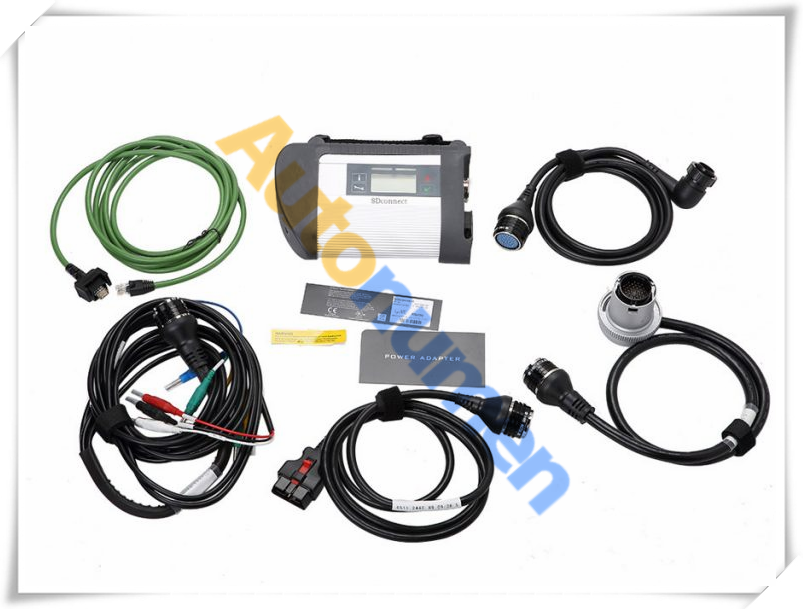
MB Star Diagnostic SD Connect Compact C4 MB SD Connect C4 Multiplexer
11.1
autonumen.com Kindly note:
1.autonumen.com only offer free after-sales service within 1 year warranty for the product order from us.
2.We do not free offer technical support for product from other suppliers, due to the quality different, much MB SD C4 multiplexer can only send back to supplier for repair.
3. If Customer need technical support for your Benz diagnostic tool MB SD C4 Multiplexer from Other suppliers indeed, just pay 39usd for each time, then contact Skype:obd2tool02 for technical support.
Why order the MB SD C4 from autonumen.com?
1. SD Connect Serial Number 100925(autonumen.com Kindly note: serial number 101923 or 101044 SD CONNECT may be locked when you update firmware?
2. Star Diagnosis SD Connect C4 firmware update available.
3. DAS/XENTRY Software from autonumen.com have Blask list path can help sd connect C4 mux avoid locked.
4. Full New Chips layout on PCB board which inlud UDS Chips which support scn online coding via dealer account.
5. All SDConnect will be power on and aging than 12 hours, and it will be tested 3 times with Ecus before shipping
20151029010232 57364 Buy MB SD C4 from Aliexpress or Other Online Shop?
6. autonumen.com MB SD C4 Mutiplexer have 1 year free warranty, we offer free after-sales service for device from us under warranty.
More question about MB SD C4 Multiplexer from autonumen.com just feel free to keep your order number to contact us freely. Thanks.

Tuesday, July 10, 2018

Why Choose MB SD C4 from Autonumen.com

MB SD C4 was most popular MB Star Diagnostic Tool, MB SD C4 Multiplexer from Aliexpress is much more cheaper than Autonumen.com. As we all know the MB SD C4 request after-sales service more often than other device. Up to now, there are so many MB SD C4 customer who order from Aliexpress different ask for after-sales service. Such as following case:
MB Star Diagnostic SD Connect Compact C4 MB SD Connect C4 Multiplexer
14.1
Autonumen.com Kindly note:
1.Autonumen.com only offer free after-sales service within 1 year warranty for the product order from us.
2.We do not free offer technical support for product from other suppliers, due to the quality different, much MB SD C4 multiplexer can only send back to supplier for repair.
3. If Customer need technical support for your Benz diagnostic tool MB SD C4 Multiplexer from Other suppliers indeed, just pay 39usd for each time, then contact Skype:obd2tool02 for technical support.
Why order the Benz Diagnostic Tool MB SD C4 from Autonumen.com?
1. SD Connect Serial Number 100925(Autonumen.com Kindly note: serial number 101923 or 101044 SD CONNECT may be locked when you update firmware?
2. Star Diagnosis SD Connect C4 firmware update available.
3. DAS/XENTRY Software from Autonumen.com have Blask list path can help sd connect C4 mux avoid locked.
4. Full New Chips layout on PCB board which inlud UDS Chips which support scn online coding via dealer account.
5. All SDConnect will be power on and aging than 12 hours, and it will be tested 3 times with Ecus before shipping
20151029010232 57364 Buy MB SD C4 from Aliexpress or Other Online Shop?
6. Autonumen.com MB SD C4 Mutiplexer have 1 year free warranty, we offer free after-sales service for device from us under warranty.
More question about MB SD C4 Multiplexer from Autonumen.com just feel free to keep your order number to contact us freely. Thanks.

Tuesday, June 26, 2018

Some problem when you operate the MB Star C4

So many customer meet some problem when they operate MB Star C4.If you also have some problem .pls do not worry about that .you could tell us what is happened and send the picture which step could not work .Our engineer will solve that one by one for you .
Here Let us to show some problem we often meet then how to solve that as following :
Q1: The MB Star Diagnostic Tool MB STAR C4 could work with the window 7?
A1: Although the moveable hard disk version is compatible with WIN7, better Professional version. But we suggest you not use WIN7, 90% sdc4 software get broken because of the usage of WIN7.
Q2: When you operate the mb star c4 but that the Screen become blue after  insert SD C4 Dell D60 hard disk into the computer and open it.
A2: Pls note : you need make sure your Dell D630 computer is integrated video card and with 1GB memory, because the D630 of discrete video card is easy to have blue screen or shutdown and restart, restart and shutdown.
Q3:When you operate that .if appear the problem as following picture ?
14.1
A3: Pls do not worry about that .you need activate that .and then we will send the the Xentry deverloper file then you will activate that is ok .
14.2
Here i wont list more one by one here ,if you meet any problem when you operate the mb star c4 ,pls contact us on our website : www.autonumen.com .

Wednesday, June 6, 2018

V2017.12 MB SD Connect C4/C5 BMW ICOM/ICOM A2 A3 HDD Setting

Customer’s problem:
We had purchased one set MB Star Diagnostic Tools MB SD connect C5 with internal HDD from obd2tool, We really appreciate the faster shipment, all is well packed dhl week quickly received. But when we install the HDD to our computer, we have blue screen and doesn’t access to computer windows. We are wondering if we get the broken HDD……
Our Answers:
The BMW ICOM ICOM A2 A3 or MB STAR C4 C5 drives we assign to our customers are generally AHCI-mode hard drives with SATA port.
If your laptop BIOS is not set to the same hard drive mode (AHCI mode), if you connected to our hard drive to your computer, there will be a blue screen or can not find the hard drive.Please make sure your HDD is set to AHCI in the BIOS.
To check this you turn the laptop on and press F2, it will enter the BIOS. Now go to “ONBOARD DEVICES” or “SYSTEM CONFIGURATION” then go to “SATA OPERATION” press enter and make sure its set to AHCI not ATA or any other option.
Please have a minimum of 2GB of ram/memory in your laptop, a lot of people only have 512mb or 1gb, it is OK but the new system may run slow and its recommend to really have 4GB ram, but 2GB also can be enough.
– We can supply Laptop + Software all ready for you.
– We can supply FULL package C4 SD + Laptop + Software for you. MB Star Diagnostic Tools
– We can carry out some C4 SD repairs.
– Remote installations available (if you supply the correct HDD size and install the correct Windows OS).
– Teamviewer remote support available.
See more click:http://www.autonumen.com/

Thursday, May 3, 2018

Mercedes Star Diagnostic Tool Review

The Mercedes Star diagnostic tool comes in a variety of formats such as C3, C4 and C5. The C3 and C4 are very similar, just the difference is that the C4 is smaller and lightweight, which is very useful due to the C3 being a task in itself setting it up. The C5 is the same format at the C4 but it can update itself (WiFi) via an official web directory.
Why did I choose the MB STAR C3?
Owning 4 Mercedes and many others in the family, fault codes are very common and are difficult to uncover unless you own a Star Machine. The MB Star C3 can interact with cars from 1989 to now, which covers the majority of the cars I own. The ability to read troublesome stored codes and erase them once resolved is very useful and also saves money in the long run with the majority of independent garages charging £30-40 to scan your Mercedes.
How Hard is it to use the Mercedes Star Machine?
There is two parts to using the Mercedes Star Diagnostic tool, the first being the setup and the latter actually using it. As you can see above, their are a few leads involved to connect the Mercedes to the star machine.
Wire from ECU to the Multiplexor
Wire from Multiplexor to the Computer
Power Cable to the Laptop (It’s advised never to let the computer run out during diagnostics!)
Power pack if low battery that might die during the test
Once the wires have been connected up properly, start the iginition and you should wait until you see a lock appear in the bottom right corner of your computer (near internet signal). Once the lock is present, the computer is connected to the car, therefore start up the DAS/Xentury software and do the following:
Find your car using the menu provided (Car -> E Class -> W210 etc)
You will then be greeted with a popup notifying that the multiplexor is attempting to connect
Once connected, its fairly straight forward – You can perform tests or go into individual units
Using F1, F2 and F3, you will be able to navigate through stored fault codes and removing them with the F9 key
If faults are not removing, its best to print out the full test (button bottom right), which will contain unique MB Codes to show a mechanic
The Star machine enables you to find a problem, fix it and confirm that it is fixed by erasing the issue and then running another test. If you are feeling confident, you may feel like running some more complex tests i.e. Compression test. I had issues with the fuel injectors in my 320 CDi, therefore I performed a compression test, which was spot on but the second test was the “leak” test, which showed two injectors were faulty.

Wednesday, April 4, 2018

New Arrived Super Dprog5 Audi/VW Mileage Programmer

We’d like to introduce our new arrived product Super Dprog5 IMMO Odometer Airbag Reset Tool 3 in 1 , what is it ? Lets check the details as following :
Super Dprog5 Audi/VW Mileage Programmer is Super Dprog5 IMMO Odometer Airbag Reset Function 3  in 1 Tool. Super Dprog5 VAG Prog2 not only work for mileage adjustment for Audi/VW, but also work for BMW/BENZ immo & airbag reset functions. Super Dprog5 Audi/VW odometer correction tool can replace Data Smart 3+. What functions does Super Dprog5 work do? What Cars Does Super Dprog5 VAG Prog2 support? Below eobdtool.com share detail about Super Dprog5 Odometer Immo Airbag Reset 3 in 1 tool for custom reference.
What Did the Super Dprog5 IMMO Odometer Airbag Reset Tool 3 in 1 Do?
Super Dprog5 perform instrument calibration, security immo key match, airbag repair and other functions.
Super Dprog5 can realize self-diagnosis function, can automatically identify and diagnose system faults.
Super Dprog5 support ISO9141, CANBUS, and J1850 protocols.
Super Dprog5 Immo Function Coverage:
all BMW CAS (including CAS3-9S12XDP512) programming.
Super Dprog5 Odometer adjustmenet coverage:
-all M35080 instruments (incl.M35080 V6), no need dismantle for adjustment; BMW transmission OBD setting; E38/ E39/ E46/ E53 instrument, EWS/ LCM and EWS4 adjustment.
-Mercedes-Benz ignition module adjustment (912/ 9S12 series ignition module don’t need to disassemble CPU), W211/ W203/ W164 and before year 2000 OBD adjustment. Support Mercedes-Benz Gateway (CGW) adjustment.
-Volkswagen / Audi / Chrysler / GM / Ford / Chevrolet / Jaguar / Lincoln / Opel / Skoda / Seat and Honda odometer adjustment.
Such as: A4 OBD2  kilometers adjustment). And support kilometers adjustment for A6L / Q7 / A8L / R8 / S8 / TT and Volkswagen / Magotan / Phaeton / Sagitar / Golf 6 /  Kaidi / Touran / Touareg / Passat / Bora / Polo / Jetta / Beatles from 2009.
Super Dprog5 MCU calibration coverage:
Audi / VW Gateway module calibration,
EDC15 / EDC16 engine calibration.
1. Write the VW key with the new Megamos48 chip
2. OBD2 key match (no need password, no need online)
3. For Volkswagen, Skoda, Seat 4th security system models (the instrument use NEC+24C64 or NEC+24C32 or Macrons (CDC) or 9s12xhz512 (1M80F) microcontroller)
The 4th VW IMMO software coverage:
NEC + 24C08 software
NEC + 24C64 software
NEC + 24C32 software
NEC + 95320 software
Micronas (CDC) software
9s12xhz512 (1M80F) software
PASSAT 2012 (NEC+24C64) software
The 4th Audi IMMO software:
A6L/ Q7 software
A3 / TT/ R8 software
A1 software
Any other details welcome to check our website directly
Enjoy your purchasing from our store